Software Design
The Cheddar Chasers software is organized into modular components that handle sensing, motion control, mapping, and decision-making. Each module is responsible for a specific aspect of the robot’s behavior, allowing the system to reliably navigate and solve the maze using real-time sensor data and a flood-fill pathfinding algorithm.
Project File Structure
The image below shows the organization of the software files used in the project.
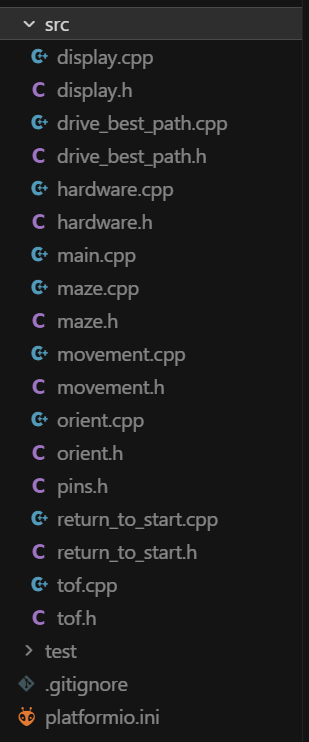
ToF.cpp — Distance Sensing & Wall Detection
This file manages the Time-of-Flight (ToF) sensors mounted on the front of the robot. It is responsible for initializing the sensors, collecting distance measurements, and filtering the data to ensure reliability. The module also determines whether walls are present in front of the robot and provides routines that allow the robot to precisely align itself within a maze cell using distance-based corrections.
movement.cpp — Motion Primitives & Navigation
This file defines the robot’s core movement behaviors, including driving forward, turning, and stopping. It uses encoder feedback and sensor input to ensure accurate and repeatable motion. In addition to basic movement primitives, it includes higher-level routines that combine turns and forward motion, enabling the robot to execute full navigation steps between maze cells.
maze.cpp — Mapping & Path Planning
This file implements the maze representation and pathfinding logic. It maintains a grid-based map of the maze, storing detected walls and updating them as the robot explores. A flood-fill algorithm is used to compute the shortest path to the goal, dynamically updating as new information is gathered. The module selects the best direction for the robot to move at each step.
main.cpp — Control Loop & Decision Making
This file contains the main control loop that coordinates all subsystems. It continuously performs sensing, mapping, decision-making, and movement. At each step, the robot centers itself, detects surrounding walls, updates the maze map, computes the optimal next move, and executes it. Once the goal is reached, it also determines and displays the best path through the maze.
hardware.cpp — Low-Level Hardware Control
This file interfaces directly with the robot’s hardware, including motors, encoders, and infrared sensors. It provides functions for motor control, sensor reading, and real-time feedback. It also implements wall-following control, allowing the robot to maintain a stable and centered trajectory while navigating the maze.
display.cpp — Visualization & Debug Output
This file manages the onboard OLED display used for debugging and visualization. It presents real-time information such as the robot’s position, sensor readings, detected walls, and movement decisions. It can also display the computed optimal path, providing insight into how the robot understands and solves the maze.
Drive_best_path.cpp — Replays the quickest found path to the goal
This file manages the replay phases after the mouse has already explored the maze and returned to the start. It calculates the shortest path to either the goal or the starting cell using a “visited-only” flood-fill algorithm, ensuring the mouse only drives through cells it has physically confirmed and mapped during the exploration phase. The module supports three modes: a “best path” run, a “fast back” run to return home, and a high-speed “fast there” run. Each phase uses a precomputed shot of the maze to navigate without needing to rescan walls or re-explore unknown areas.
Orient.cpp — Figures the heading before explorations
This file determines the starting position and heading when placed in any of the maze’s four corners. As the mouse travels, it records local wall observations and compares them against the known constraints of a maze’s outer boundary. For example, if the robot senses an open path where a hypothesis predicts a boundary wall, that hypothesis is deleted. Once only one hypothesis remains, the system “locks” on that orientation and returns to start exploring the maze.
Return_to_start.cpp — Travels home while finding unvisited cells
This file guides the robot from the goal back to the starting square. It uses a specialized flood-fill algorithm that targets the origin while maintaining an exploration bias. It actively prefers moving into unvisited cells even if they aren’t the most direct route, allowing the mouse to map more of the maze on its way home. This module also tracks the robot’s visited cells and provides a visual path for the return trip. By the time the mouse reaches home, it has gathered enough wall data to calculate the most efficient path for its final high-speed runs.