Software Design
Software Flow Chart
The Flow Chart below shows the basic organization of the code.
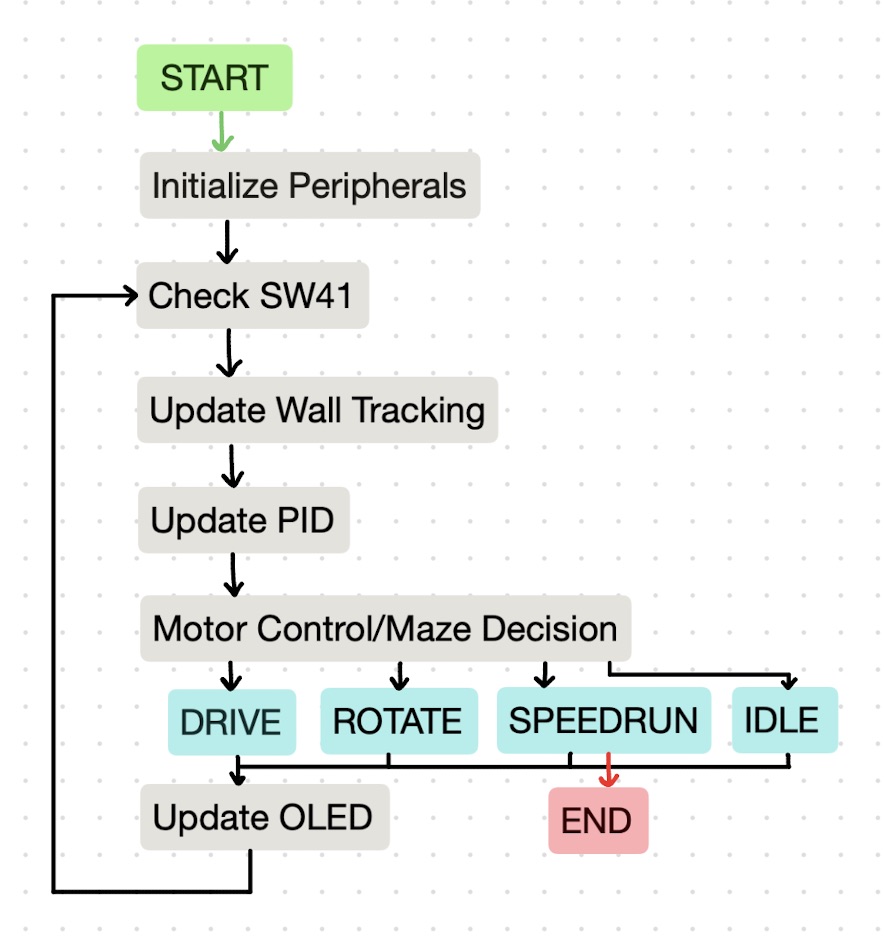
Initialize Peripherals
The initialization of all peripherals and necessary variables takes place in the "setup()" section of the code. The serial monitor, ToF sensors, OLED screen, and PWM and encoder pins are initialized in this block, as well as parts of the maze. The maze's memory is allocated and the boolean variables tracking current mouse location set to "false," as no travel has begun yet!
Check SW41
The first step of the "loop()" code--which, as its name indicates, loops indefinitely--is to check the status of our speedrun button. If the button has been depressed and mouse indicates it is back at the start of the maze (state == IDLE and goalReached == true), the code jumps to SPEEDRUN mode.
Update Wall Tracking
The next section in the loop updates the wall distance readings from the ToF sensors and calls the function logCurrentWalls() if the mouse is in an unvisited cell. Determining whether or not the mouse is in a new cell depends on the forward driving encoder counts of the motors. When logging a new cell, the code ensures the mouse is not in any of the four goal cells before moving on. If the mouse is not in a new cell, it moves on to adjusting the PID controllers.
Update PID
There are two PIDs that interact with the speed of the motors (PWM): an encoder PID and a wall-centering PID.
Wall-Centering PID
The first PID called is the wall-centering PID, which reads in distance data from the ToF sensors and centers the mouse between walls accordingly.
Encoder PID
The other PID used is the encoder PID, which keeps track of the difference in encoder counts between the two motors and adjusts their speeds to most closely match. We discovered early on in our testing that the encoder counts between the two motors would always be slightly off, due most likely to small mechanical differences in the two. Thus, we use a PID controller to match the two counts and ensure the mouse doesn't veer to one side, especially in open cells.
Motor Control/Maze Decision
Now, the code splits into a few different directions based on the FSM states: IDLE, DRIVE, ROTATE, and SPEEDRUN.
IDLE
In IDLE, the mouse's motors stop spinning and it remains stationary where it lies. This state is called between DRIVE and SPEEDRUN states before the speedrun button is pressed and after navigating to the end of the maze and finishing a 5 second celebration spin. It's also called if an issue is encountered in calculating the path for the speedrun. It serves as a placeholder between two states when the mouse is still in operation, but the user or the code hasn't indicated what it would like it to do yet.
DRIVE
In DRIVE, the mouse is driving in a straight line, starting at the base PWM. Though intuitive, it's important to know when the mouse is in DRIVE so the correct PID can be used, we know when to log walls, etc.
SPEEDRUN
The DRIVE and SPEEDRUN states overlap in their PID and turn controls, though they use slightly different base values to prevent wheel slipping at a higher PWM in SPEEDRUN. Different from DRIVE, SPEEDRUN does not rely on the front sensor at all and simply uses encoder counts and the calculated path to navigate. This means the mouse can travel at higher speeds but is less reliable near front walls. Outside of the PID overlap with the DRIVE state, SPEEDRUN keeps track of its own internal "states"--srTurning and srDriving--to keep track of its own encoder counts and cell boundary crossings while following the built optimal path.
ROTATE
In ROTATE, the mouse is making a 90 or 180 degree turn to the left or right. The turn decision is made elsewhere in the code and then relayed to set functions [spinRight() and spinLeft()] to be executed. When in exploration, the turn decisions are logged to be used in calculating the final speedrun path.
Update OLED
Finally, at the bottom of the loop, the OLED screen is updated to clearly display important information, like the current state, cardinal direction, and whether or not the goal has been found.
The Floodfill Algorithm
A floodfill algorithm is a breadth-first search variant. It computes the shortest distance from a target cell to every other cell in the maze, propagating outward in all directions. To ensure the most efficient path is calculated without running into walls, the mouse utilizes two floodfill variants--optimistic and pessimistic--which define our understanding of unexplored areas.
Optimistic: During the exploration portion of the run, the mouse assumes that any cell not yet visited has no walls, and treats them as open when calculating the flood path.
Pessimistic: When returning from the center of the maze during exploration, and when calculating the fastest route for the speedrun, the mouse assumes any cells not visited are occupied by walls. This avoids the mouse running into walls when not actively exploring and possibly mistaking a cell that's closed as open and vice versa.
Prior to exploration, all four goal cells are seeded as a flood distance of 0, defining them as the target cells for the algorithm. Before the mouse decides which way to turn in the DRIVE state, it calculates the flood from the current cell to the target and finds the flood distance for the neighboring cells.
In the race, our mouse performed two full optimistic/pessimistic exploration runs before calculating the fastest path between the two. If we were to make a revision, we might change the exploration to explore a different direction optimistically on the way back to the origin. This would save time in the exploration phase (only one run instead of two) and may explore more locations than the original plan.